We have been trying to add a basic security configuration to Webapi, but even if we give all roles to a user, every option in the interface shows as not having enough permissions. User is able to log in, so I assume the system is at least applying the role 1, but every other action seems restricted. I remember reading about a role for the user that should be automatically created and assigned when logging, is that still a thing?
I believe the default permissions for most operations are applied to role 10 (Atlas User), so you might want to associate that user to role_10 = 10.
The permissions are going to be simplified in Atlas 3.0.
Yes, user also has that role, that’s what is most puzzling
Ok, I’m not sure which version of WebAPI you are using, however for starters (without going into any advanced javascript debugging or SQL queries) you can see what permissions you’re granted by going into dev-console in chrome (ctrl-shift-i) and switching over to the network tab.
If you refresh your browser (from the ATLAS home page, should be fine) you’ll see a lot of network activities, but you can filter them. The request that returns your permissions to the client is found by filtering to user/me like in this screenshot:
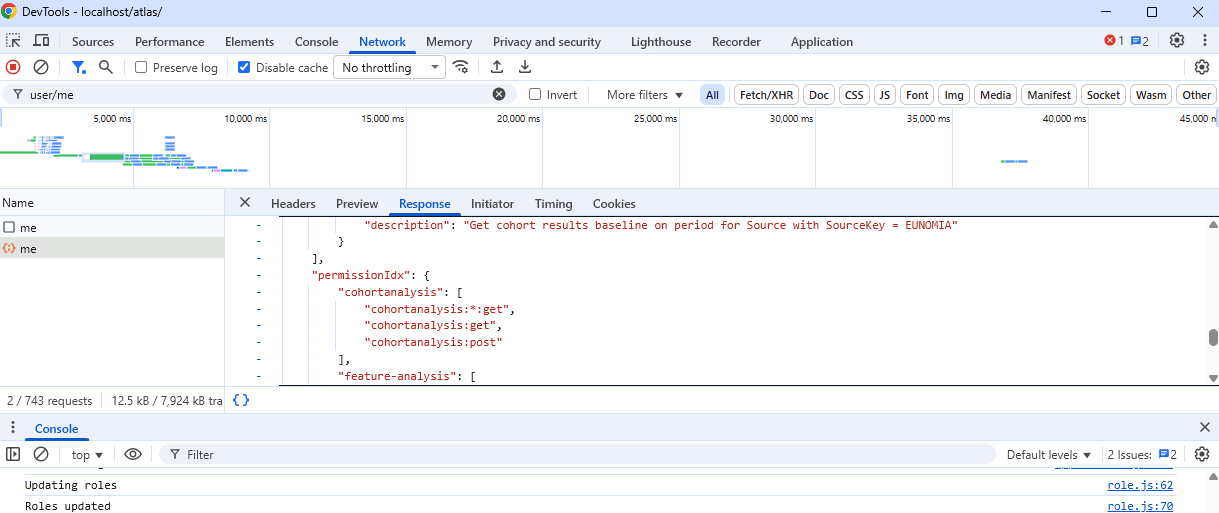
What you see here is i’ve filtered to user/me, i’ve selected the one that shows the request, and I’ve navigated to the ‘response’ tab. The response tab has a JSON reprensetastion of your permissions.
Can you let me know if you can find this, and which version of WebAPI you’re running. We may need to do some javascript diving or sql query to see what’s going on if you are up for it.
I’m also wondering if it’s a cachign thing where if you alter permissions directly on the database, you need to signal to the App to refresh the cache. Restarting the service should clear the cache out…there’s also a ‘clear server cache’ button in the configuration section of ATLAS.